

CLI
The gaffer CLI scaffolds projections, runs them locally against fixtures or live KurrentDB, drives the debugger, and hosts the LSP and MCP servers.
Commands
Section titled “Commands”| Command | What it does |
|---|---|
gaffer init | Create gaffer.toml in the current directory. |
gaffer scaffold <path> | Create a projection file at <path> and register it in gaffer.toml. |
gaffer dev <name> | Run a projection against fixtures (--fixture <name> or --events <path>) or live KurrentDB. |
gaffer info <name> | Print the projection’s details: source, partitioning, declared fixtures, engine version, matched events, whether it emits events, and any diagnostics. |
gaffer diff <projection> | Compare two versions of a projection. By default, local against deployed (in sync, drifted, not deployed, untracked, or invalid); --left/--right compare any two versions (local, deployed, or a history content-hash). |
gaffer status [projection] | Show the runtime state of projections on an environment and how they compare to local config. |
gaffer history <projection> | Show a deployed projection’s version history, newest first, attributing each change (deploy, updated, lifecycle) with its deployer and a content hash. Interactive on a terminal; --json/piped prints the latest versions. |
gaffer deploy [projection] | Create or update projections on an environment: create the new ones, update the changed ones, skip the in-sync ones. Plans the whole run, then validates it and refuses if any projection won’t run (--no-validate bypasses). Shows the plan and confirms before applying (--yes skips); a production target (server-declared, or production = true on the env) is extra-guarded and refuses --no-validate. --dry-run shows the plan and applies nothing. Exits with a stable code for CI. |
gaffer rollback <projection> <hash> | Roll a deployed projection back to a prior version from its history, named by content hash. Confirms with a diff first; local files stay untouched. |
gaffer enable <projection> | Enable (start) a deployed projection so it resumes from its last checkpoint. |
gaffer disable <projection> | Disable (stop) a deployed projection, writing a final checkpoint (--abort skips it). |
gaffer recreate <projection> | Destroy and rebuild a deployed projection from local config, reprocessing from zero (--delete-emitted also wipes emitted streams). |
gaffer delete <projection> | Delete a deployed projection with its state and checkpoint streams (--delete-emitted also removes emitted streams). |
gaffer auth | Sign in to an environment’s OAuth identity provider and store the token. See [env.<name>.oauth]. |
gaffer mcp | Start the gaffer MCP server over stdio. See MCP. |
gaffer lsp | Start the gaffer LSP server over stdio. Used by the VS Code extension. |
gaffer config | Manage user-level configuration (telemetry opt-out, anonymous identity). |
gaffer version | Print the gaffer version. |
See the full command reference for every subcommand and flag, or run gaffer <command> --help.
The operate verbs (gaffer enable, gaffer disable, gaffer delete, gaffer recreate, gaffer rollback) act on user projections only: a $-prefixed system projection ($by_category, $streams) is refused, since gaffer doesn’t manage system projections.
Interactive mode
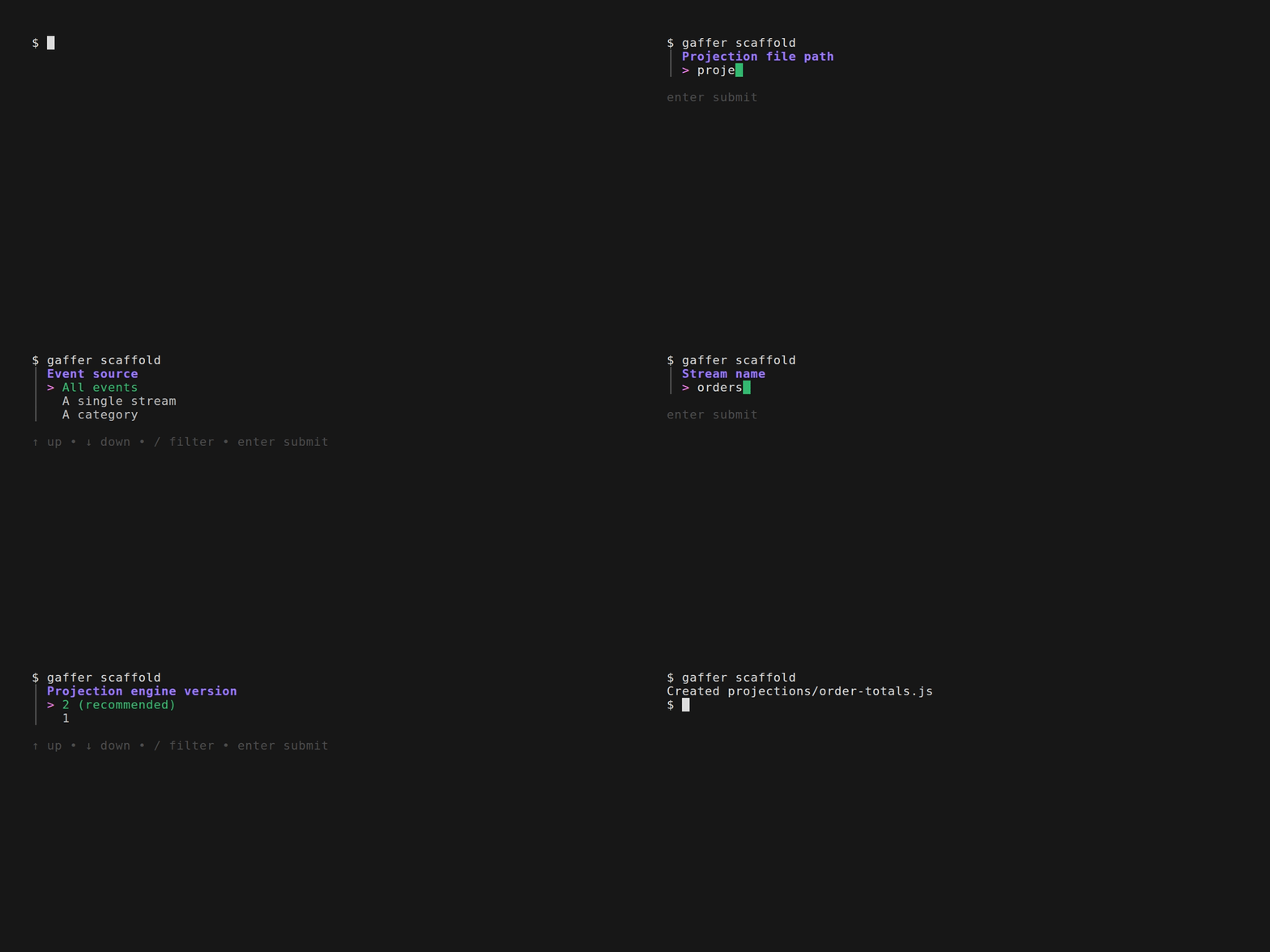
Section titled “Interactive mode”On a terminal, gaffer scaffold and gaffer dev prompt for anything you didn’t pass on the command line:
gaffer scaffoldasks for the path (when omitted) and any of source, partitioning, emit, and engine version not set via flags.gaffer devasks which projection to run (when omitted) and which event source to use when none is pinned via--events,--fixture,--connection, or--env. The picker lists every declared fixture and configured environment; with a single source it’s used without asking.
Anything you pass explicitly (a positional or a flag) is taken as-is and never re-prompted; only the gaps are asked. Pass --yes (-y) to skip prompts and accept defaults, the same thing that happens automatically when input isn’t a terminal (pipes, CI), so scripts keep working unchanged. Press Ctrl-C or Esc on any prompt to cancel.
Project configuration
Section titled “Project configuration”Each gaffer project has a gaffer.toml at its root, created by gaffer init. It declares the projections in the project, their entry files, and any named fixtures:
[env.local]connection = "kurrentdb://localhost:2113?tls=false"default = true
[[projection]]name = "order-count"entry = "projections/order-count.js"engine_version = 2fixtures.happy = "fixtures/orders.json"fixtures.full = "fixtures/orders-full.json"
Top-level keys:
[env.<name>]: an environment, naming a KurrentDB connection. Each block has a requiredconnection(the connection string, supporting${VAR}expansion so credentials can stay out of the file) and an optionaldefaultbool. At most one environment may be the default. An optionalproductionbool opts the environment into the production guard tier (louder confirmations,--no-validaterefused). Select an environment withgaffer dev --env <name>or pick it from the interactive prompt;--envcan be omitted on a non-interactive run when one environment is the default. An environment can also authenticate with OAuth, an X.509 client certificate, or basic credentials; see Authentication. See Environment file and the gaffer.toml reference.
engine_version is set per-[[projection]] (1 or 2), not at the top level.
Per-projection ([[projection]]):
name: the lookup key forgaffer dev <name>and other commands.entry: path to the projection JS file, relative to the project root.engine_version:1or2. Required on every projection. V1 is for legacy compatibility; V2 is the default for new projections.fixtures.<name>: path to a JSON events file, relative to the project root. Referenced fromgaffer dev <name> --fixture <fixture-name>.
Environment file (.env)
Section titled “Environment file (.env)”A .env file at the project root is loaded into the environment when gaffer starts, so secrets stay out of gaffer.toml and out of version control. Reference them in an environment’s connection with ${VAR}:
[env.local]connection = "kurrentdb://admin:${DB_PASSWORD}@localhost:2113".env supplies any environment variable gaffer reads, including the telemetry and update-check opt-outs below.
A per-environment .env.<env> file (matching the selected [env.<name>]) overlays the base .env, so each environment can carry its own credentials. The precedence, highest first, is the shell environment, then .env.<env>, then the base .env. A variable set in your shell, or injected by CI, is never overwritten by either file.
User configuration
Section titled “User configuration”User-level settings (telemetry opt-out and a per-install anonymous identity) live in a platform-specific config directory:
- Linux:
$XDG_CONFIG_HOME/gaffer/config.toml(default~/.config/gaffer/config.toml). - macOS:
~/Library/Application Support/gaffer/config.toml. - Windows:
%AppData%\gaffer\config.toml.
Set GAFFER_CONFIG_DIR to override.
Manage with gaffer config:
gaffer config telemetry status # show current opt-in state and identitygaffer config telemetry off # opt out of telemetrygaffer config telemetry on # opt back inProject-level telemetry is opted out by setting telemetry = false at the top of gaffer.toml.
Common flags
Section titled “Common flags”--json: structured output instead of the default text rendering.gaffer dev --jsonemits NDJSON, one object per line, each tagged with atype:info,event,result,error,fatal_error,summary,auth_required, andrun_error.auth_requiredsignals that a live run needs an interactive sign-in, andrun_errorthat a run ended on a connection failure.gaffer deploy --jsonemits a JSON array, one object per projection;gaffer deploy --dry-run --jsoninstead emits an envelope object - a top-levelverdict(in-sync,deployable, orblocked, what a real deploy would do), thechangescount, the resolvedenv/targetand whether it’sproduction, anyconfigDrift, and the per-projectionplanarray. Adding--streamswitchesgaffer deploy --json’s apply to NDJSON, one event per line tagged with atype. Adeploy_startmarks each projection beginning (withindex/total), adeploy_resultcarries its settled outcome (the array’s per-projection shape), and a terminaldeploy_summarycounts the outcomes. It streams progress live instead of buffering the whole run, and likegaffer dev --jsonit exits non-zero if the stream can’t be written.--streamis for the apply: it can’t be combined with--dry-run(a preview stays--dry-run --json), and stdout stays strictly one-object-per-line throughout, so even a pre-apply refusal streams the blocking projections and a terminaldeploy_summary.gaffer status --jsonemits an object: the resolvedenv,targetserver, and whether it’sproduction, aprojectionsarray (one object per projection), plus an optionalconfigDriftarray.configDriftappears when the target’s engine config diverges from a declared[database_config], one{"knob", "server", "local"}object per differing knob in its native unit; when the node’s options can’t be read (auth refusal, no HTTP surface), aconfigDriftErrorstring carries the reason instead, so a missingconfigDriftis never mistaken for “in sync”.gaffer history --jsonemits a JSON array, one object per entry; other commands emit a single JSON object.gaffer status --jsoncarries, per projection,owner(in-config,orphan,foreign, orunknown); ahash(the deployed definition’s content hash) when the projection is deployed; alastDeployedtimestamp and alastWrite(the deploying tool, its version, the source revision, and the actor) when the projection carries deploy metadata;attribution(local-ahead,changed-by-tool, orchanged-server) on a drifted projection; and, when its drift isinvalid(the local definition doesn’t compile or has a config error), areasonfield with the compile or config error.gaffer diff --jsondescribes the two versions being compared asleftandright(each withref, contenthash, and canonicalsource), plus a structuredlinesarray (each row taggedequal,removed, oradded, with per-side line numbers and the changed intraline span). For the default deployed-vs-local diff it also carries averdictobject holding the samedrift,owner,attribution,lastDeployed,lastWrite, andreasonfields as status; a version-to-version diff (--left/--rightother than the default) is a pure source diff with no verdict. Thegaffer statustable likewise gainsLAST DEPLOYandDEPLOYED VIAcolumns. Ingaffer deploy --json(and eachplanitem of--dry-run --json), anupdateditem carrieslogicChange: truewhen the query changed and deploy continued from the existing checkpoint, andexternalChange: true(withexternalChangeToolnaming the tool, when another made the change) when the deployed definition was changed outside gaffer since its last deploy, so CI can alert on either. Arefuseditem carriesrecreate: true(it’s valid but needs a recreate), distinct from aninvaliditem whose local definition won’t run; an item may also carryfaulted(an update over a faulted projection) oremittingReset(a rebuild that re-emits). Eachgaffer history --jsonentry carriesversion,time, the fullcontentHash, akind(deploy,rollback,reset,recreate,updated-by,updated,enabled,disabled,reconfigured,rewritten,created,deleted, orunreadable), and theenabledandoutOfBandflags (the latter true for a non-gaffer write once gaffer has been managing the projection). A recreate’s disable and delete writes stay separate entries in--json(the human timeline folds them into therecreateentry). ThestateChangeanddeletedflags appear only when true; thetool,toolVersion,actor,operation, andrevisioncome with a metadata-carrying entry;changeSummary(what moved, e.g.query changed) comes on a metadata-lessupdatedentry; andconfigChanges(the checkpoint or performance knobs that moved) comes on areconfiguredentry.gaffer enable,gaffer disable,gaffer delete, andgaffer recreateeach emit{"name", "outcome"}, whereoutcomeisenabled,disabled,aborted,deleted, orrecreated.gaffer rollbackemits{"name", "outcome", "hash"}with the full target content hash, whereoutcomeisrolled-back, orunchangedwhen the target is already deployed. Ifgaffer dev --jsoncan’t write its stream (for example, a broken pipe to the editor), it exits non-zero instead of finishing silently, so a consumer can tell the NDJSON stream was truncated.--debug: starts the DAP debug server alongsidegaffer dev. See Debugging projections.--env <name>: select an environment fromgaffer.tomlfor a command that touches a live KurrentDB (gaffer dev,gaffer diff,gaffer status,gaffer history,gaffer deploy,gaffer rollback,gaffer enable,gaffer disable,gaffer recreate,gaffer delete). Optional when one environment is markeddefault, or on a terminal where you’re prompted to pick; required for non-interactive runs with no default.--connection: ad-hoc connection string for a single invocation ofgaffer dev,gaffer diff,gaffer status,gaffer history,gaffer deploy,gaffer rollback,gaffer enable,gaffer disable,gaffer recreate, orgaffer delete. Overrides--envand the configured environment, and bypasses the whole[env.<name>]block: no OAuth or client certificate is presented, no.env.<env>overlay is read, and aproduction = trueopt-in doesn’t apply. The standard basic-auth variables still resolve from the shell and the base.env, so ambientKURRENTDB_USERNAME/KURRENTDB_PASSWORDare presented to the ad-hoc host. A production cluster reached via--connectiongets the production guard tier only when the server declares itself production through a readable$server-infostream; when that stream can’t be read (ACL restrictions, older servers), the tier silently stays baseline.--fixture <name>/--events <path>: pick a named fixture fromgaffer.toml, or point at a JSON events file directly. These offline sources are mutually exclusive with the live ones (--env/--connection); combining the two is a usage error.--yes/-y: skip interactive prompts and accept defaults. Applies togaffer scaffold,gaffer dev,gaffer deploy, and the guarded operate verbs (gaffer delete,gaffer recreate, andgaffer rollbackalways,gaffer disableagainst production). Forgaffer deploy,gaffer delete,gaffer recreate,gaffer rollback, and a productiongaffer disableit stands in as the confirmation, so pass it in scripts and CI: without a terminal those refuse to act unless--yesis given. See Interactive mode.GAFFER_ACTOR/GAFFER_REVISION(environment variables,gaffer deploy): override the acting identity and source revision recorded in deploy metadata. They default to the connection’s user and the project’s git commit; set these in CI to record the pipeline identity, or the canonical commit when the checkout’s HEAD isn’t it (e.g. a PR build’s synthetic merge commit).GAFFER_TIMEOUT_MS(environment variable): bounds how long a projection may compile or run locally before gaffer treats it as hung, in milliseconds. It applies wherever gaffer runs the engine locally:gaffer dev, and the compile-and-validate steps behind commands likegaffer deploy,gaffer diff, andgaffer status. Raise it from the 5000ms default only on slow hardware. The[database_config]timeouts declare the server’s configuration and do not affect local runs.
Content hash
Section titled “Content hash”gaffer deploy, gaffer status, and gaffer diff decide whether a projection changed by hashing its deployable definition: the engine version, the emit flag, emitted-stream tracking, and the query source. gaffer history identifies each deployed definition by its hash (a lifecycle entry, such as an enable or disable, changes no definition and carries none), and gaffer rollback targets a definition by any unique prefix of its hash.
The query is canonicalised before hashing, so byte differences an editor introduces without changing the code don’t count as drift. A leading UTF-8 BOM is stripped, CRLF line endings normalise to LF, and trailing newlines trim to exactly one. Nothing else is normalised. A lone CR (one that isn’t part of a CRLF pair) and trailing spaces are real differences, so they do count as drift.
Exit codes
Section titled “Exit codes”gaffer deploy uses a stable exit code so a pipeline can branch on the result:
0: succeeded, or nothing to do (everything already in sync).1: an error. A projection is invalid (won’t compile, or would fault on the server), a server call failed, or the plan has a projection deploy can’t apply in place (a refusal needing a recreate).2: changes are pending. Only--dry-runreturns this; it means the plan has work to apply.3: refused by a guardrail. Confirmation was needed but there was no terminal and no--yes, or--no-validatewas used against production. Re-run satisfying the guardrail.gaffer recreate,gaffer rollback,gaffer disable, andgaffer deletealso exit3when a guarded action can’t confirm non-interactively (gaffer enablehas no guarded action, so it never does).4: an environment needs an interactive sign-in (no stored token, or a locked keyring). Rungaffer auth --env <name>, then retry. Any command that connects to an OAuth environment (deploy,diff,status,history, the operate verbs) exits4when it has no stored credential.gaffer diffalso exits4when a stored token is rejected mid-command, such as an expired session.
A typical CI check is gaffer deploy --dry-run: exit 0 means in sync, 2 means drift to apply, 1 means something needs attention.
Telemetry
Section titled “Telemetry”The CLI emits anonymous usage telemetry by default. See the telemetry notice for the full list of what’s collected.
Opt out at the user level via any of:
gaffer config telemetry off(persists to the user config file).GAFFER_TELEMETRY_OPTOUT=1in the environment.KURRENTDB_TELEMETRY_OPTOUT=1in the environment.DO_NOT_TRACK=1in the environment.- VS Code’s
telemetry.telemetryLevelset tooff(the extension and CLI both respect it).
The environment-variable opt-outs are read from your shell or a project .env.
Opt out at the project level by setting telemetry = false in gaffer.toml.
Update check
Section titled “Update check”Once a day, a gaffer invocation checks npm for a newer release and prints a one-line notice on stderr when one exists. The notice is withheld when stderr isn’t a terminal or the run emits structured output; the check still refreshes its cached result, which editor integrations read. At most one request a day is made, cached in the platform cache directory (set GAFFER_CACHE_DIR to override).
Skip the check entirely with either:
--no-update-check, on any command, for a single invocation.GAFFER_NO_UPDATE_CHECK=1in the environment, for CI and scripted runs.